
Highlights from the October Agentic AI to Empower OSPOs show-and-tell


On October 27, the Agentic AI to Empower OSPOs working group hosted its monthly show-and-tell with David Lippert, director of the George Washington University Open Source Program Office (GW OSPO). His talk, How the GW OSPO Uses Skill.md and AI, showed how an OSPO can write down its own standards once and then let an AI tool apply them, with people still making the final call.
This post summarizes what we learned. The full meeting notes are available in the working group repository.
The deck itself was built with one of the skills shown in the session. View the presentation or read its source.
It starts with a design system
GW OSPO supports students, faculty, staff, and researchers through consultations, workshops, events, and awards. Each activity needs flyers, newsletters, slides, or web pages, and all of them must follow the university brand. That is a recurring task, and recurring tasks are good candidates for a documented, reusable workflow.
The whole workflow is built on a design system: the written rules, colors, fonts, logos, and graphic elements that define how GW OSPO materials should look. The AI does not invent the brand. It reads the design system and applies it. David shared three connected open source projects:
| Project | Role in the workflow |
|---|---|
| gwospo-brand | Defines the design system: brand assets and design rules |
| gw-design-review | Checks a draft against the design system and four design principles |
| gw-presentation | Creates GW-branded slides that follow the design system from the start |
What sits inside a skill
A skill is more than a prompt. In the design-review project, a SKILL.md file tells the AI how to look at a design and how to write the review. Supporting folders give it what it needs to do that work:
- brand/: the design rulebook, the approved colors, and a profile of who reads the reviews.
- references/: the brand checks, the design principles, and the expected report format.
- scripts/: small tools that measure contrast, audit colors, and turn PDFs into images.
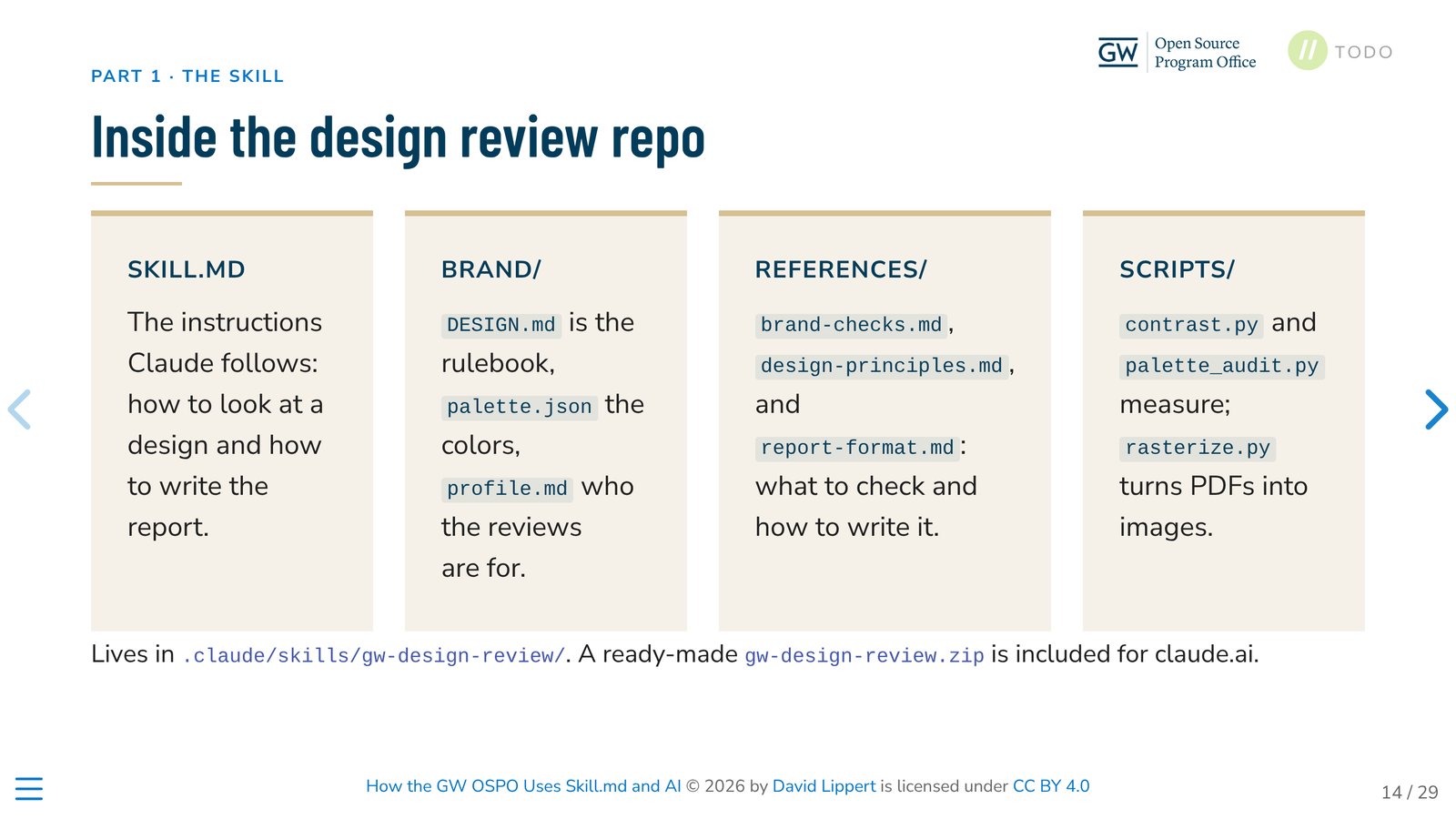
The scripts handle what can be measured. The instructions guide how the findings are interpreted and explained. Because the brand rules live in one place, updating the rulebook updates the reviewer.
Note:
SKILL.mdis an open standard. GW OSPO’s skills follow Agent Skills, an open format for giving AI agents reusable instructions and resources. Agent Skills is now a project of the Agentic AI Foundation (AAIF), part of the Linux Foundation, and many agent tools support it. A skill is a folder with a requiredSKILL.mdfile (a shortnameanddescription, then the instructions) and optionalscripts/,references/, andassets/folders. Agents first read only the name and description of each skill. They load the full instructions, and any referenced files, only when a task needs them. See the specification and the project on GitHub.
A review that people can act on
The review fits into the communications workflow instead of replacing it:
- The team creates a flyer, newsletter, presentation, or other material, by hand or with AI help.
- The draft and its context go to the AI tool with the skill available.
- The tool writes a review against the design system.
- The people responsible read the findings, revise, and approve.
The request should include context: what the material is, where it will appear, who it is for, and what readers should do next. With this information, the review can judge whether the design does its job, not only whether it follows the rules.
The report format is part of the skill. Each review opens with a one-line read and what is already working. Then it separates findings into must fix (brand or accessibility rules), should fix (readability), and consider (optional suggestions). It ends with a short “if you only do three things” list.
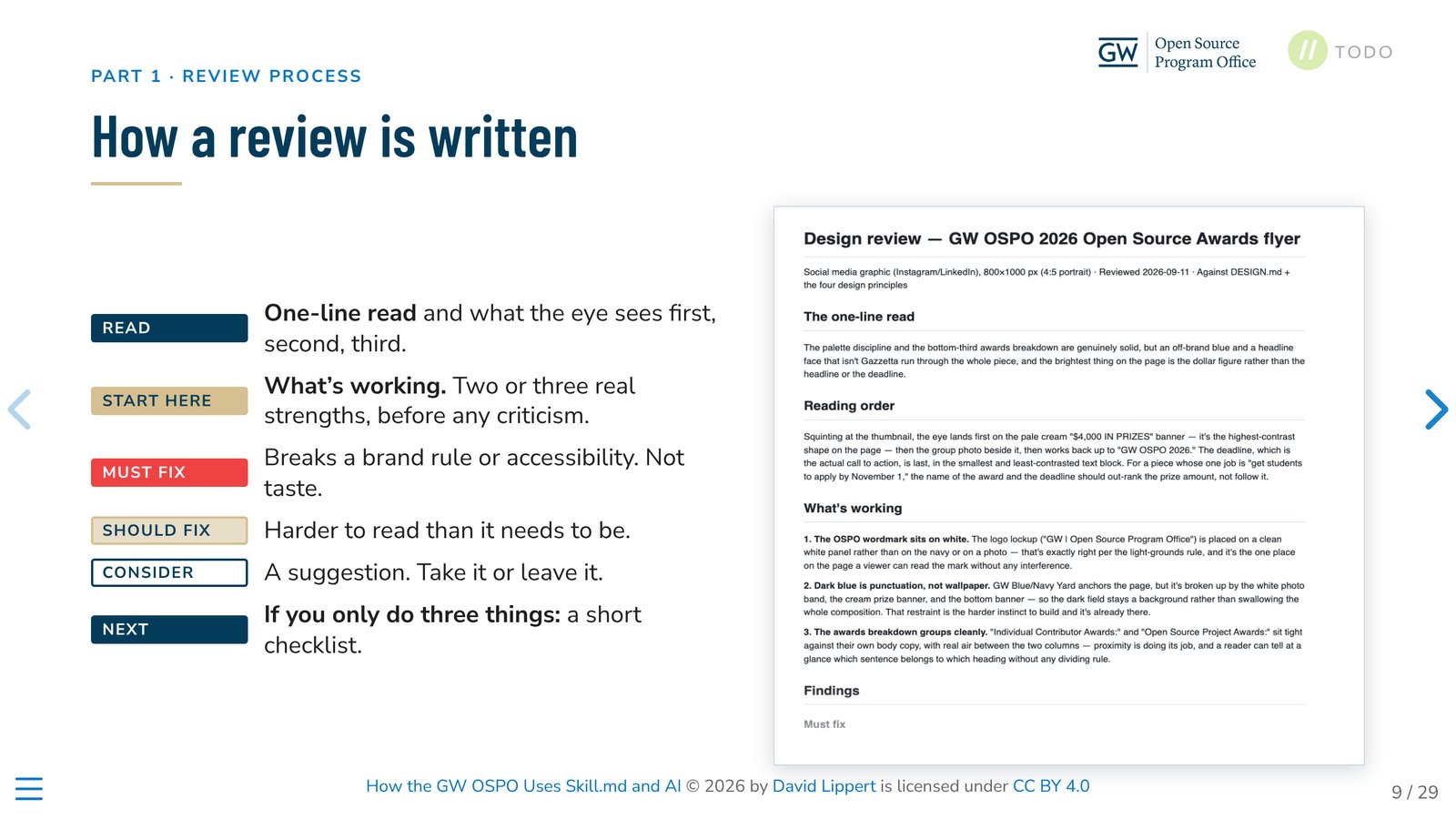
The example was a student awards flyer. The review found an off-brand blue, headline type that did not follow the brand rules, and a hierarchy that made the prize amount more prominent than the application deadline. It combined GW-specific rules with four general principles: proximity, alignment, repetition, and contrast.
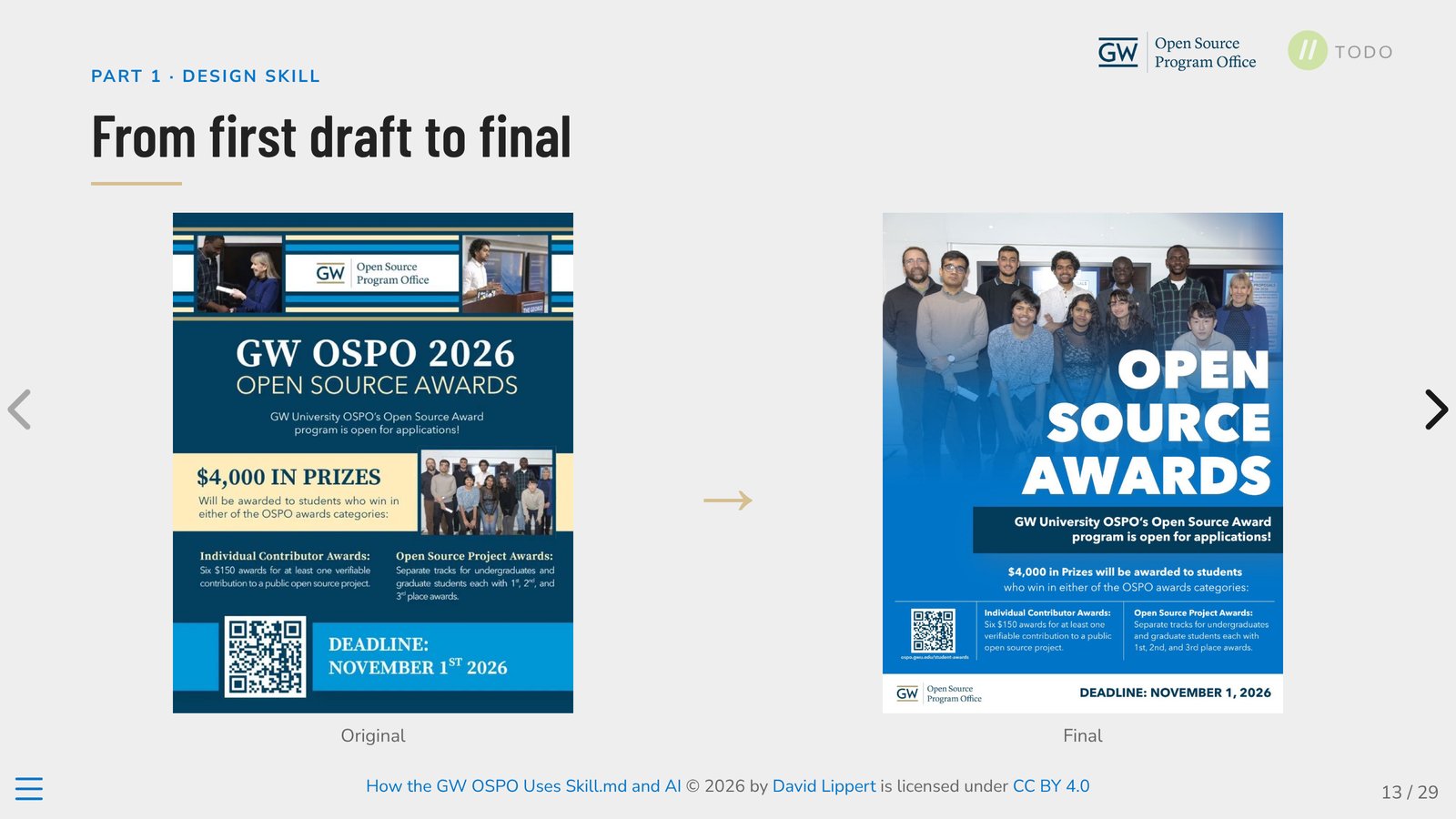
David showed several ways to use the skill: a packaged ZIP for a web chat interface, or the repository folder for desktop tools. He has used it with one desktop AI tool and has not yet tested it across others, so portability is an open area for the group to explore.
Separate content from format, and save tokens
David built his own presentation with Quarto, following the brand rules of the gw-presentation skill. In Quarto, the words live in a readable .qmd file and the visual style lives in a separate theme file. A person can edit the source directly, or ask an AI agent to change it, and then render the deck. During the session, David switched the theme of his presentation and every slide changed, while the content stayed exactly the same. That separation means the people who own the message can always open the source, read it, and change it, without needing to touch the design.
The second benefit is efficiency. When an AI agent writes a document, every character it produces costs output tokens. David showed an example from Professor John P. Helveston’s posit::conf(2026) talk: the same short paragraph takes 125 characters in Quarto, 252 in LaTeX, 377 in HTML, and 663 in the XML inside a Word file. In David’s slide, this becomes about 1.8 times the output tokens for LaTeX, 4 times for HTML, and 7.2 times for Word, compared with Quarto.
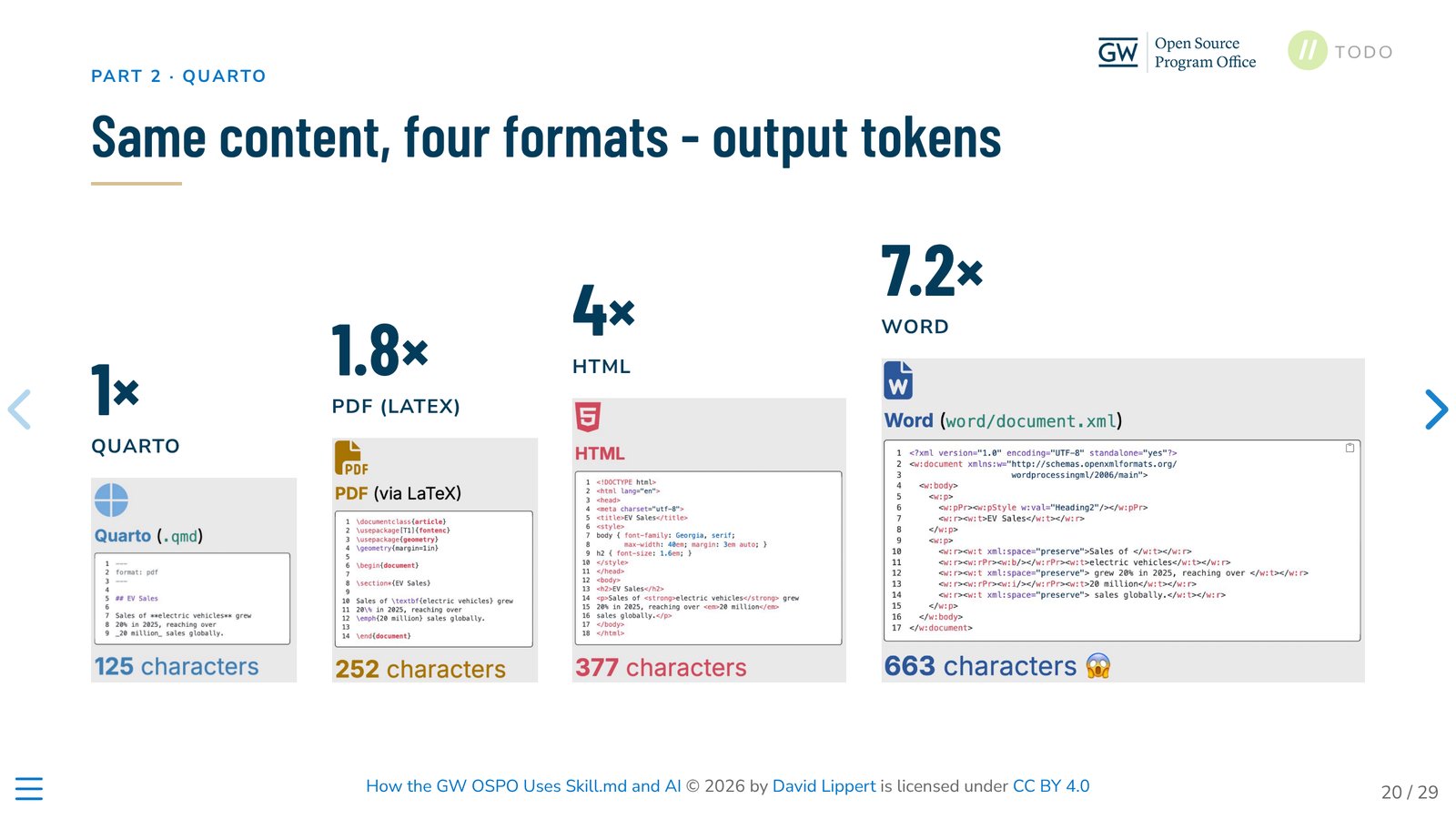
The practical lesson: ask the agent to write the compact source, and let a renderer such as Quarto produce the PDF, web page, slides, or Word file. The agent generates less text, so the work is cheaper and faster. The source is also short and readable, so it is easier for people to check and for Git to show what changed.
How another OSPO can build its own branded slides
The GW projects are open source, and they are designed to be adapted. For example, David’s deck already combines two brands: it loads the GW theme and then a separate TODO Group theme file on top of it (todo-group-theme.scss). An OSPO, or a community such as the TODO Group, could follow these steps:
- Write down your design system. Collect your colors, fonts, logos, graphic elements, and layout rules as Markdown files and asset folders, as gwospo-brand does.
- Fork the skill and replace the brand. In a fork of gw-presentation, replace the brand reference (
references/brand.md), the logos inassets/, and the colors and fonts in the theme. Keep the general parts, such as the slide layouts, the “one idea per slide” principles, and the step that renders every slide to check it. Then update thenameanddescriptioninSKILL.mdso the agent knows when to use your skill. - Or start from a Quarto theme. If you prefer Quarto, write your brand as a theme file, such as
gw-theme.scss, and keep each talk in its own.qmdfile. - Add a reviewer. Adapt gw-design-review the same way: replace the files in its
brand/folder and keep the general design principles and report format. - Install it. Put the skill folder where your AI tool looks for skills, as described in that tool’s documentation. Because the format is an open standard, the same folder works across tools that support Agent Skills.
Check the licenses before you reuse anything. The code and text are open source, but the GW logos and graphic elements are not licensed for reuse, so replace them with your own brand assets.
Humans stay in the loop
Human judgment remained part of both workflows. David described AI-assisted image handling that cropped people’s faces, a reminder to always inspect the final result, even when the tool follows clear instructions. The setup also respects different working styles: staff can keep creating materials by hand and still benefit from an AI-assisted review later in the process.
Open group questions
For the working group, the reusable contribution is the pattern itself: instructions, organizational references, a defined report format, and measurable checks, all open for other OSPOs to inspect and adapt. The session also left open questions for the group to explore together:
- Which recurring OSPO practices can we document as reusable skills?
- What organizational context must go with the instructions?
- Which findings can scripts measure?
- Does the output help people finish their work, and how much revision is still needed?
Get involved
Do you have an AI-assisted OSPO workflow, an experiment, or a governance challenge to share? The working group welcomes contributions at any stage:
- Join the conversation: join the TODO Slack and find the #wg-ai-agents channel.
- Join a community call: find the next session on the community calendar.
- Contribute an example: explore the working group repository and bring your work.
- Meet the chairs: connect with the working group chairs.
Learn more about the people, show-and-tells, and shared work on the Agentic AI to Empower OSPOs page.
Thank you to David Lippert and the GW OSPO team for sharing their work openly.
Slide images are from How the GW OSPO Uses Skill.md and AI © 2026 by David Lippert, licensed under CC BY 4.0.